
Your website is attracting potential buyers every day. The problem is that most of them leave without telling you who they are.
No form submission. No demo request. No email address. Just lost opportunities.
That's why businesses invest in visitor identification tools like Leadfeeder and Lead Forensics. Both promise to reveal the companies behind your website traffic, helping sales teams uncover hidden opportunities and generate more pipeline from visitors who would otherwise remain anonymous.
But while both tools aim to solve the same problem, they take different approaches.
One focuses on simplicity and transparent pricing. The other emphasizes database depth and hands-on support. Choosing the wrong one could mean paying more, missing valuable insights, or creating extra work for your team.
Choosing the wrong one quietly drains both your pipeline and your budget.
In this guide, you will learn:
- How Leadfeeder and Lead Forensics each identify your visitors
- Where every tool wins and where it falls short
- A side-by-side comparison table with the key differences
- Honest, review-backed pros and cons from real users
- The one limit both tools share
- How to choose the right fit, plus a person-level alternative
By the end, you will know exactly which tool suits your team, and whether a smarter, person-level option fits you better. Let us start with how the two compare at a glance.
Leadfeeder vs Lead Forensics at a Glance
Before the deep dive, here is a quick view of Leadfeeder vs Lead Forensics:
What Is Leadfeeder?
Leadfeeder, now part of Dealfront, is a website visitor identification software that reveals which companies visit your site. It reads visitor IP addresses, matches them to a business database, and shows the company name, industry, size, location, and the pages each one viewed. This Leadfeeder vs Lead Forensics comparison starts with the tool most teams try first.
How Leadfeeder Identifies Website Visitors
Leadfeeder installs a lightweight tracking script and ties into your analytics. Within a day, it begins naming the companies behind your traffic, complete with visit history, pages viewed, and time on site. Because it leans on IP-to-company matching, accuracy is strongest when your visitors browse from corporate networks rather than home or mobile connections.
Leadfeeder's Core Features
Leadfeeder packs the essentials a lean team needs to act on traffic fast.
- Company identification: Reveals the business behind each visit with industry, size, and location.
- Behaviour-based lead scoring: Ranks accounts by engagement so you follow up with the warmest first.
- Real-time alerts and feeds: Pings reps when a tracked company returns or hits a key page.
- Custom reports and filters: Builds views by rep, region, or campaign for sharper outreach.
- Wide integrations: Connects to Salesforce, HubSpot, Pipedrive, Zoho, Microsoft Dynamics, Slack, and Google Ads, plus an API.
- AI insights: Layer ICP insights and no-code workflows on top of raw visitor data.
Pros and Cons
Pros
- Fast, simple setup: Install the script and see named companies the same day.
- Transparent pricing: You can read the tiers without booking a sales call.
- Strong integrations: Slots neatly into an existing CRM and ad stack.
- Compliance-first: Built with GDPR and European data residency in mind.
Cons
- Company-level only: No person-level identification, so the contact stays a guess.
- Patchy data on some reveals: Reviewers report outdated or missing details.
- Costs scale fast: Higher traffic pushes you into pricier tiers quickly.
- Remote traffic gap: Home and mobile IP addresses often go unidentified.
Pricing
- Free tier + paid subscription, starts from $99/month billed Annually
What Is Lead Forensics?
Lead Forensics is a B2B website visitor tracking tool that identifies the companies browsing your site in real time. It owns a large business IP database and pairs each visit with firmographic detail and decision-maker contact data.
How Lead Forensics Identifies Website Visitors
Lead Forensics matches visitor IPs against its own proprietary database, one of the largest of its kind. The instant a known business lands on your site, it fires an alert with the company profile and suggested contacts. Like every IP-based tool, it reads firms with dedicated networks far better than it reads remote or mobile visitors.
Lead Forensics' Core Features
Lead Forensics aims for depth and scale rather than simplicity.
- Real-time identification: Surfaces browsing companies the moment they arrive.
- Deep firmographic profiles: Adds industry, company size, contact details, and decision-maker data.
- Automated lead scoring: Ranks visitors by fit and engagement for faster triage.
- Built-in lead manager: Ships its own portal, with CRM integrations on higher tiers.
- Scheduled reports and alerts: Sends weekly reports and high-value visitor triggers.
- Unlimited user access: Opens the platform to your whole team with no per-seat caps.
Pros and Cons
Pros
- Large IP database: Strong firmographic coverage, especially across the UK and Europe.
- Dedicated support: Every account gets a named customer success manager.
- Real-time alerts: Quick notifications when target accounts browse.
- Unlimited seats: Whole teams can log in without extra license fees.
Cons
- Company-level only: No person-level identification, the same core gap as its rivals.
- Opaque, premium pricing: No public rates, and costs skew high.
- Annual contracts: No monthly option, so you commit upfront.
- Steeper, dated interface: Reviewers note a learning curve and an aging look.
Pricing
- Custom quote, no free plan, starts from $6K annual contract
Also Read: 15 Best B2B Website Visitor Identification Tools
Leadfeeder vs Lead Forensics: The Head-to-Head Breakdown
Both tools chase the same goal, yet the details decide the winner. Here is how Leadfeeder vs Lead Forensics compares across the factors that actually move the pipeline:
1. Visitor Identification and Match Rate
Leadfeeder works by reading the IP address behind every visit and matching it to a company in its database. When that match lands, you see the business name, its industry, its size, and the exact pages it viewed. The real catch is the hit rate, because no IP-based tool can see every visitor. Leadfeeder reports identifying up to 45% of companies, and that number falls fast when people browse from home, on mobile, or behind a VPN.
Lead Forensics takes a similar IP-based approach but backs it with one of the largest proprietary business databases around. That bigger database can widen its reach, especially for firms it already has on file. Still, the same limit applies to any IP method. Its visitor identification match rate depends heavily on how many of your visitors sit on registered company networks rather than personal connections.
2. Data Accuracy and Enrichment Quality
Leadfeeder has a strong reputation for data you can trust. On G2, reviewers regularly praise it for clean, up-to-date records and far fewer wrong or missing contacts. This matters more than it sounds. When the company details are accurate, your reps waste fewer touches and personalise faster. They spend their time on real prospects instead of chasing dead ends.
Lead Forensics goes the other way and leads with size. It carries a deeper, richer firmographic database, which looks like a clear win on paper. The reality is more mixed. Several reviewers report running into stale or inconsistent records, so you may need to double-check details before you reach out, which slows your team down.
3. Person-Level vs Company-Level Identification
Leadfeeder tells you which company visited, and then it stops. You might see that a 40-person agency opened your product page three times, which is useful context. But it never names the actual person doing the research. Your reps are left to guess who the buyer is, dig through LinkedIn, and hope they reach the right inbox before the interest fades.
Lead Forensics shares the very same blind spot. It hands you detailed company profiles, but the individual behind the visit stays hidden. So you know a business is interested, yet you still do not know who to contact. This gap in person-level vs company-level identification affects many well-known tools, including Apollo.io, and it is where warm visits quietly go cold.
4. Outreach and Automation After Identification
Leadfeeder does a good job of finding and scoring accounts, then sends them straight into your CRM with alerts. The problem starts after that handoff. Nothing happens on its own. A human still has to research the contact, write the message, choose the timing, and hit send, which eats hours every week.
Lead Forensics surfaces hot companies the moment they land and flags them for your team in real time. That speed sounds great until you realise the tool still does not act. It points at the opportunity, but the chasing is all yours. The follow-up depends on a busy rep noticing the alert and finding time to respond before the lead cools.
5. Integrations and Workflow Fit
Leadfeeder is built to slot into the tools most revenue teams already use. It connects natively with Salesforce, HubSpot, Pipedrive, Zoho, Microsoft Dynamics, Slack, and Google Ads, and it offers an API for anything else. That makes the setup feel familiar. Your visitor data flows into the systems your reps live in, with very little extra work to wire it all up.
Lead Forensics connects to a broad range of business tools, too, but it takes a different approach. It ships its own built-in lead manager, so a lot of the work can happen inside the platform itself. That suits bigger or more complex teams that want everything in one place. Just note that deeper CRM integrations often unlock only on the higher-tier plans.
6. Pricing and Contract Transparency
Leadfeeder keeps its pricing refreshingly open. It publishes its plan tiers and offers a limited free entry, so you can see roughly what you will pay before talking to anyone. You can also try the tool first and judge the value for yourself. That makes it easy to start small and scale up only when the results justify it.
Lead Forensics works the opposite way. It keeps its rates behind a sales consultation and sits at the premium end of the market. There is no public price and no monthly plan, only annual contracts. So you commit to a full year and a bigger spend before you have lived with the product day to day.
7. Ease of Setup and Time to Value
Leadfeeder is designed to get you moving fast. You drop in a lightweight tracking script, connect your analytics, and start seeing named companies the same day. There is almost no training involved. For a lean team that wants quick wins without a long rollout, this speed is one of its biggest draws.
Lead Forensics asks for more patience up front. The platform is deeper, so it takes onboarding and some training before your team feels comfortable using it well. That extra effort can pay off for larger teams that want the full feature set. But if you need results this week, you will likely wait longer to see them here.
8. Customer Support and Onboarding
Leadfeeder leans on a self-serve style of support. You get live chat, a learning academy, and regular webinars to help you find your way. For smaller, hands-on teams, that is often plenty. They can move at their own pace and solve most issues themselves without waiting for a dedicated contact.
Lead Forensics offers a much more hands-on experience. Every account gets a dedicated success manager who guides you through setup and helps you get full value. For bigger teams, that personal touch is a real advantage. Having a named expert to call makes onboarding smoother and adoption faster across a larger group of users.
9. Data Privacy and GDPR Compliance
Leadfeeder makes privacy a core part of its pitch. It leans hard into European data residency and a compliance-first reputation. It identifies visitors using public company data under legitimate-interest rules, so it does not need cookies to work. For teams selling into Europe, where the rules are strictest, that focus is reassuring.
Lead Forensics also states that it is GDPR compliant and uses the same cookie-free, IP-based method on public data. Its biggest strength here is location. With deep roots across the UK and Europe, it has long experience operating under regional privacy rules. That track record gives confidence to buyers who put data protection first.
10. Global Coverage and Geographic Reach
Leadfeeder casts a wider net geographically. Its strongest customer bases sit across the US, the UK, and Germany, which suits teams selling into several Western markets. The usual IP-based limit still applies, though. On remote or mobile traffic that carries no company signal, even Leadfeeder struggles to put a name to the visit.
Lead Forensics is strongest closer to home. Its database runs deepest across the UK and Europe, where its matches are most accurate and reliable. Step outside those core regions and the coverage starts to thin. And like Leadfeeder, it never reaches the individual, so truly global, person-level reach is where both tools fall short.
Now that you have seen how Leadfeeder vs Lead Forensics compares on features, let us look at what real users say about each tool.
Leadfeeder vs Lead Forensics: User Reviews and Ratings
Marketing pages sell the dream, but review sites show how a tool holds up day to day. Here is the honest read on Leadfeeder vs Lead Forensics from verified users.
What Real Users Say About Ladfeeder?
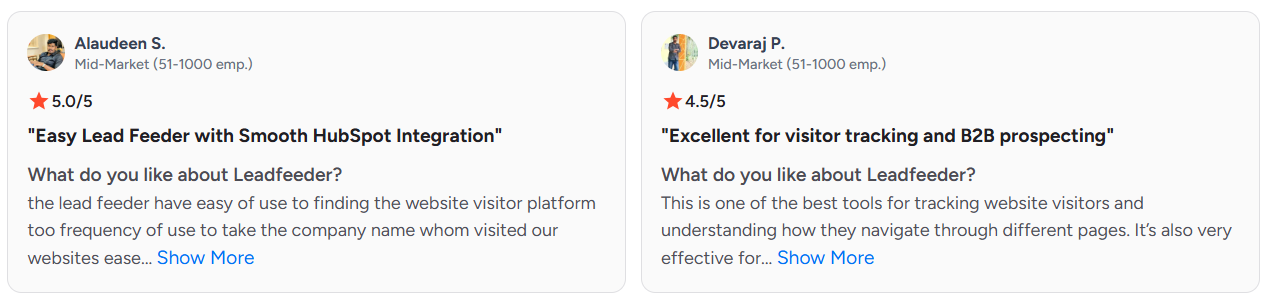
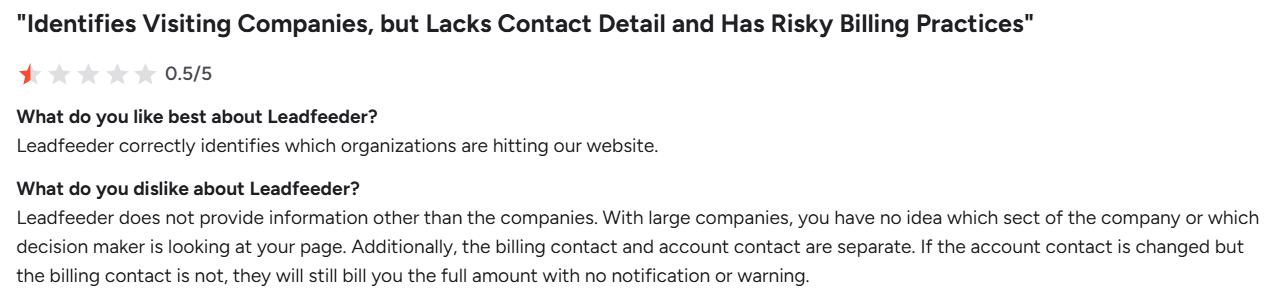
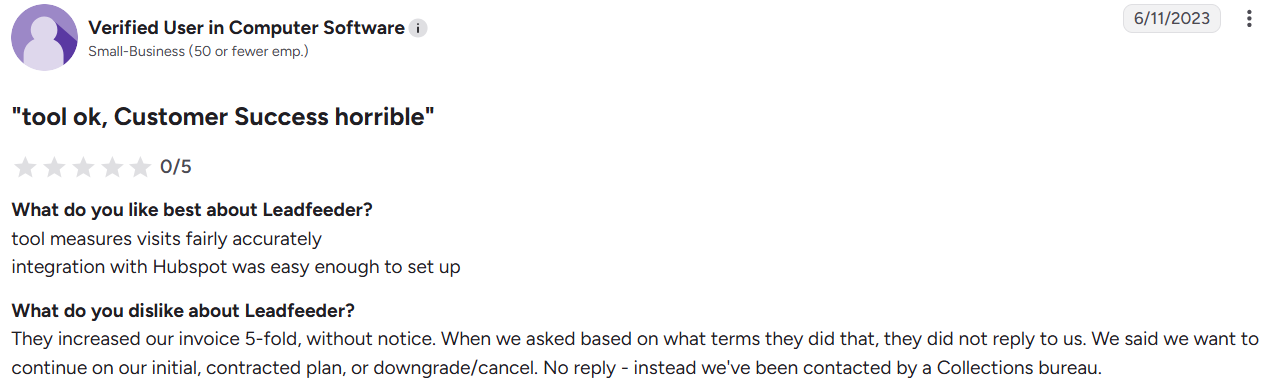
On G2, Leadfeeder holds a 4.3 out of 5 rating, with users praising its clean interface, quick setup, and CRM integrations. The recurring complaints centre on data accuracy, invisible remote traffic, and pricing that grows with volume. Buyers love the simplicity, but keep one eye on the bill.
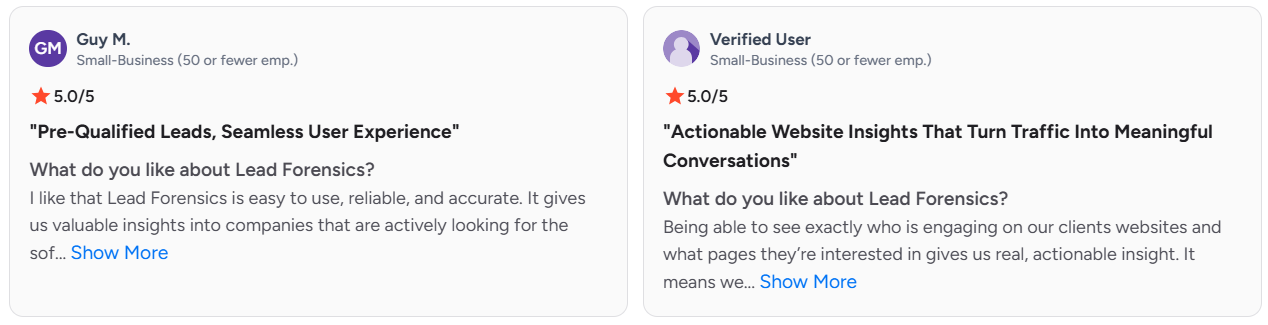
What Real Users Say About Lead Forensics?
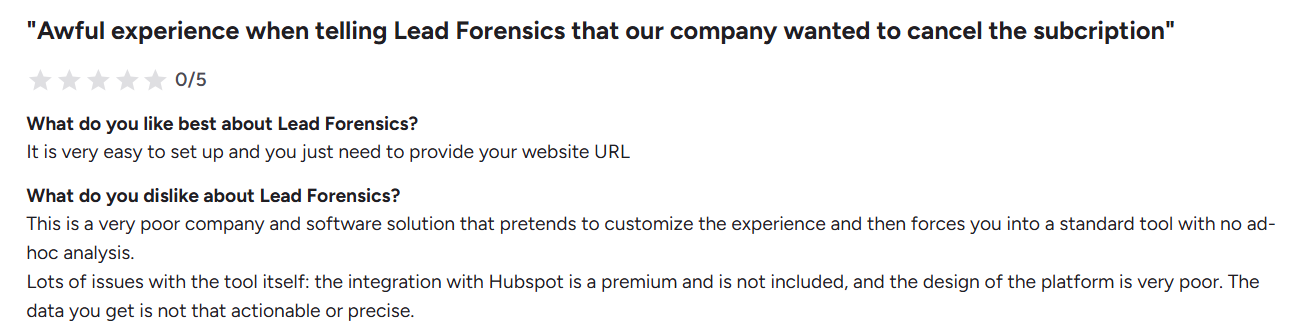
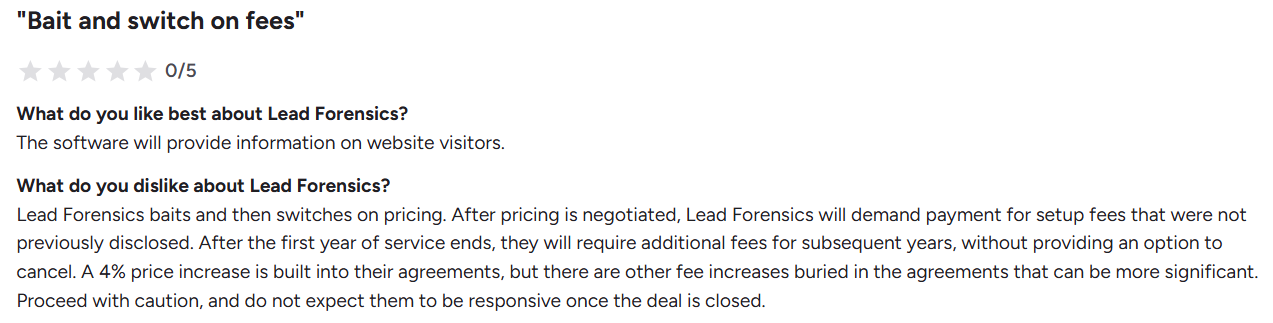
On the other side of the Leadfeeder vs Lead Forensics matchup, Lead Forensics scores a 4.4 out of 5 on G2. Reviewers highlight its rich visitor detail, useful alerts, and standout support. The pushback lands on opaque pricing, annual lock-in, and an interface that feels dated next to newer tools. It delivers strong data, but it asks for a heavier commitment in return.
The One Limitation Both Leadfeeder and Lead Forensics Share
No matter how you compare Leadfeeder and Lead Forensics, both have the same limitation: they only tell you which company visited your website, not which person.
For example, you might discover that a 200-person SaaS company visited your pricing page multiple times. That's useful information, but you still don't know who from that company showed interest. Your sales team then has to spend time finding the right contact and reaching out manually.
By the time they identify the right person, the prospect may have already moved on or chosen another solution.
There's another challenge, too. Both tools can identify visitors and send alerts, but neither tool actually engages those visitors for you. Your team still needs to research contacts, send emails, follow up, and manage conversations.
That's why many businesses are now looking for solutions that do more than just identify website visitors. They want tools that can identify the right people and help start conversations while interest is still high.
Also Read: How To Identify Anonymous Website Visitors: Meet Kwin, Your AI Business Developer
Meet Kwin: The Person-Level AI Alternative to Both
This is where a third option changes the math entirely, beyond the Leadfeeder vs Lead Forensics debate. Kwin, the AI Business Developer from Vison AI, does what visitor trackers cannot. She identifies the actual person, not just the company, and then acts on it without waiting for a rep.
Why Kwin Goes Beyond Visitor Tracking
Leadfeeder vs Lead Forensics hands you data and stops. Kwin treats identification as the start of the job, not the end. She deanonymizes visitors at both the person and company level across 175+ countries. Then she gives each visitor two scores. One shows how closely they match your ideal customer, and the other shows how ready they are to buy. The best matches move toward a booked meeting on their own.
How Kwin Works: Identify, Qualify, Nurture, Handoff
Kwin runs one clear, automated workflow, and each step does real work for your team.
- Identify: She reveals the names, companies, roles, and key details behind your anonymous traffic, so the mystery visitor becomes a real contact you can act on.
- Qualify: She scores every visitor with an ICP score and a Purchase Intent Score, so your team only ever sees prospects worth a conversation.
- Nurture: High-fit visitors enter a personalized, multi-step sequence across email and LinkedIn, triggered by an intent threshold you set, warming them while their interest is still fresh.
- Handoff: When a prospect replies positively, Kwin hands them to your team through Slack and your CRM, along with the full email thread and a short conversation summary.
Kwin vs Leadfeeder vs Lead Forensics: Where Kwin Pulls Ahead
Put all three side by side, and Kwin's advantage is hard to miss. It identifies the person and then acts, while the others stop at the company.
Why pay for legacy contracts just to learn who visited? Hire Kwin For Free and turn anonymous traffic into booked meetings, free forever for your first 100 leads every month, no credit card required.
Now that you have seen the person-level option, let us turn the whole comparison into a clear decision for your team.
How to Choose Between Leadfeeder, Lead Forensics, and Kwin
There is no single winner, only the right fit for your goals. Here is how to read Leadfeeder vs Lead Forensics, and where Kwin belongs:
1. Choose Leadfeeder If
You are an SMB or lean team that wants quick wins from existing traffic, clear published pricing, and a clean tool you can run yourself. Leadfeeder suits European-focused teams that value fast setup and tidy CRM integrations over deep, hands-on service. It is the easiest on-ramp into identifying who visits your website.
2. Choose Lead Forensics If
You run a larger sales team, sell heavily into the UK or Europe, and want a deep firmographic database with a dedicated success manager. Lead Forensics fits buyers who prefer guided onboarding and custom reporting, and who can live with annual contracts and quote-based pricing. Depth and support are its trade for transparency.
3. Choose Kwin If
You want the buyer identified, not just the company, and you want outreach to happen automatically across 175+ countries. Kwin fits teams chasing speed-to-lead, predictable pipeline, and a free starting point, without the manual research both other tools leave behind. The benefits of identifying your visitors only land when something acts on the data, and Kwin does.
Also Read: Global Visitor Identification: 175+ Countries
Conclusion
The Leadfeeder vs. Lead Forensics choice really comes down to fit. Leadfeeder wins on price transparency and speed, while Lead Forensics wins on database depth and support. Both, though, stop at the company and leave the real work to your team.
If you want more than a list of companies, the smarter move is a tool that finishes the job. Kwin identifies the buyer, qualifies them, and books the meeting while their intent is still hot. That is the kind of outcome that turns B2B lead generation into a system, not a scramble.
Ready to stop guessing who visits your site? Book a Demo and watch Kwin work on your own traffic first.